
An aluminum CNC drawing can have every size dimensioned and every tolerance filled in and still stall at quote, because it does not say which faces, bores, or edges the part is referenced from. Without a clear GD&T datum scheme, the machinist guesses how to fixture the part, the inspector guesses how to align it, and the estimator guesses where the risk sits.
This guide explains how to choose primary, secondary, and tertiary datums for aluminum housings, brackets, plates, and manifold blocks so a shop can set up, inspect, and quote your part without inventing its own reference system. It is written for design engineers, supplier quality and CMM planners, and sourcing teams preparing an RFQ. File package completeness is covered in how to prepare drawings for CNC quotes and tolerance values in CNC machining tolerances for aluminum parts; this guide covers the datums that make those tolerances interpretable.
This guide explains datum selection concepts informed by ASME Y14.5. It is educational buyer guidance, not legal advice, not a substitute for the official ASME Y14.5 standard or your company’s drafting standard, and not a claim that CharMax Precision certifies to ASME Y14.5.
Direct answer: choose datums from function, not habit
Pick datum features from how the part works in the assembly (where it mounts, seals, and locates), not from “the largest flat face” by habit. For most prismatic aluminum CNC parts:
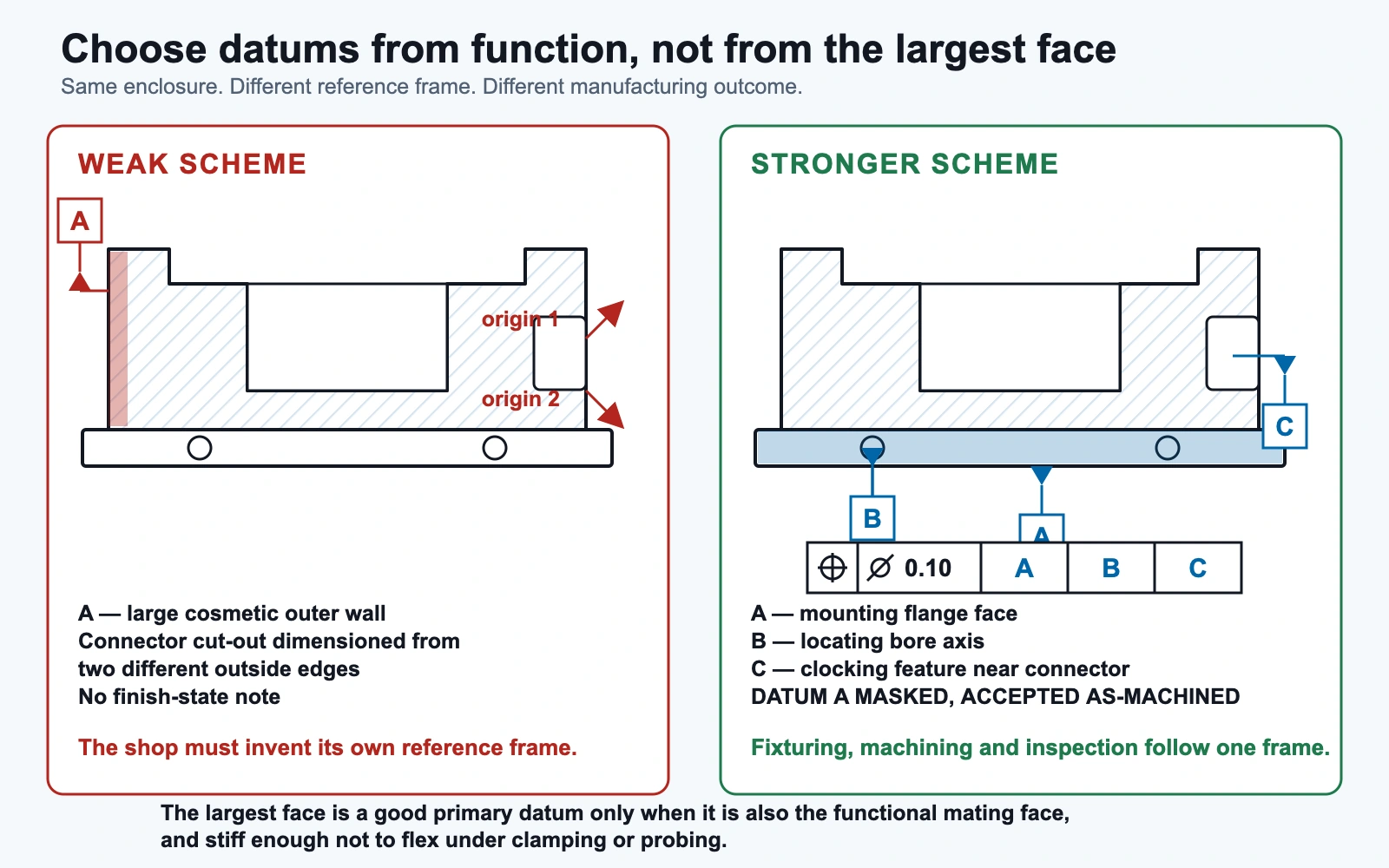
- Primary datum A = the rigid, accessible face the part sits or seals against: a mounting flange, base mounting plane, or manifold sealing face.
- Secondary datum B = the feature that stops rotation on datum A: a long edge, second perpendicular wall, locating bore, or pin-matching hole pattern.
- Tertiary datum C = the feature that stops the last slide: a short edge, clocking slot, or second locating hole.
- Part condition = whether datum features are accepted as-machined or as-finished under anodize, and whether thin walls are inspected free-state or restrained.
- RFQ assumptions = if the drawing’s datums are incomplete, write the assumed A-B-C in the RFQ notes and ask the shop to confirm or redline it before the PO.
The largest face is a fine primary datum only when it is also the functional mating face and stiff enough not to flex under clamping or probing.
What a datum reference frame means for setup and inspection
These are the minimum terms a buyer needs to read and write a datum scheme on an RFQ drawing.
| Term | Plain-language definition |
|---|---|
| Datum | A theoretically exact point, axis, line, or plane (or a combination), established from a real feature. It is not the imperfect physical surface itself. |
| Datum feature | The real part feature marked with a datum feature symbol, such as a face, bore, slot, or width. It tells the shop what to fixture and probe. |
| Datum feature simulator | The idealized contacting geometry used in fixturing or inspection, such as a surface plate or gauge pin, that turns the real feature into the theoretical datum. |
| Datum reference frame (DRF) | Three mutually perpendicular planes established by the ordered datum features. Every tolerance that references A-B-C is evaluated in this one coordinate system. |
| Feature control frame (FCF) | The GD&T “sentence” stating the geometric characteristic, the tolerance, and the datums in order of precedence. |
| Datum targets | Specified contact points, lines, or areas (for example A1, A2, A3) that stop a large, warped, or flexible face from rocking in a fixture or on an inspection table. |
| Degrees of freedom (DOF) | The six ways a rigid part can move: three translations and three rotations. Ordered datums remove them so the part sits the same way every time. |
Datum precedence: A-B-C is not interchangeable
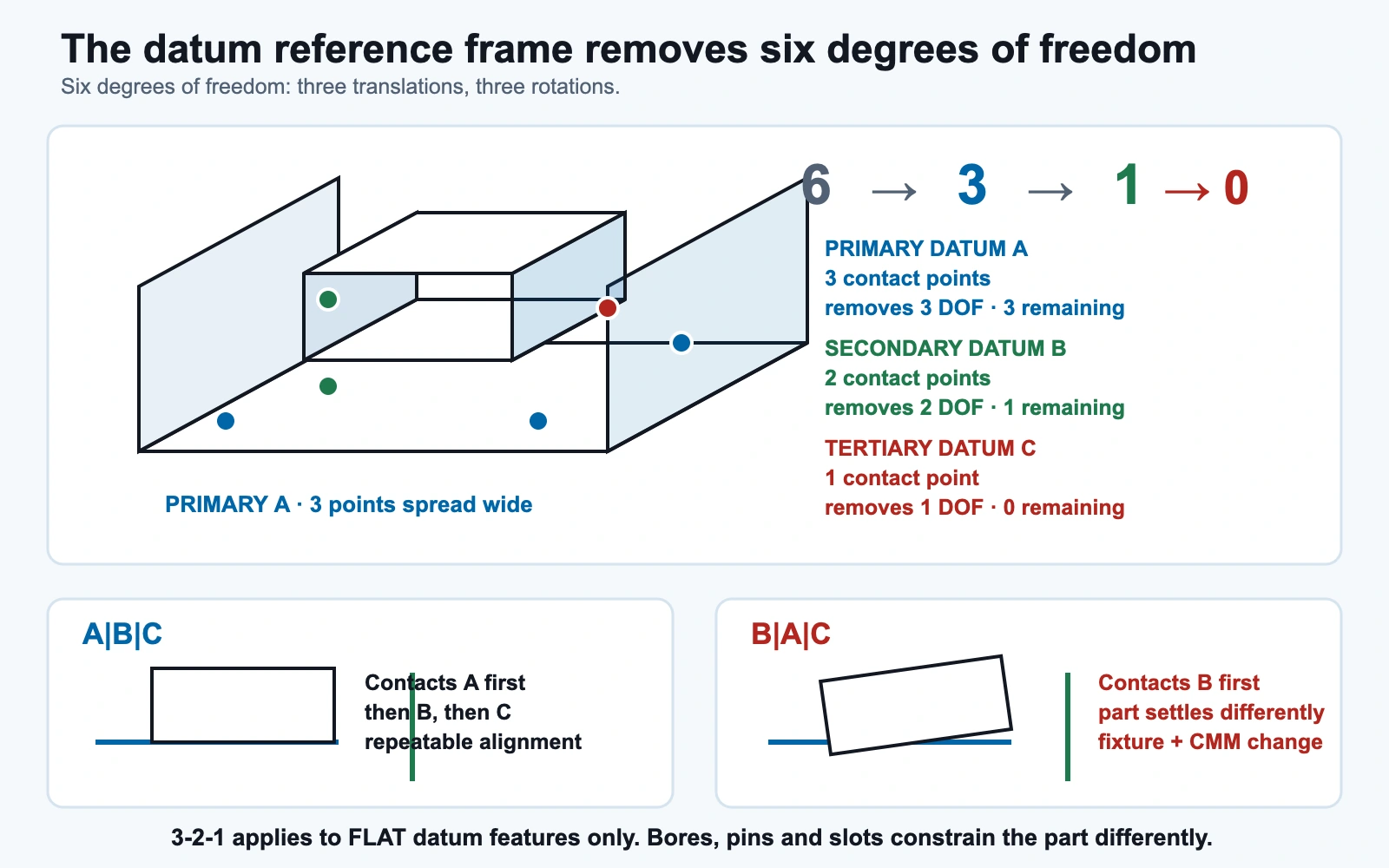
The order of datum references in a feature control frame is precedence. A|B|C and B|A|C are different requirements: changing the order changes which feature the part contacts first and how a fixture or CMM alignment must touch the part. Swapping datum order between revisions changes the inspection setup even if no dimension moved.
The 3-2-1 model for flat datums (a teaching model)
For flat datum features, a common teaching model is 3-2-1 contact:
- Primary datum A: at least three contact points; removes three degrees of freedom.
- Secondary datum B: at least two contact points; removes two more.
- Tertiary datum C: at least one contact point; removes the last one.
The 3-2-1 model is useful language for prismatic aluminum plates and housings, but it applies to flat datum features only. Datum features of size, such as a bore axis, a pin, or a slot width, constrain the part differently; check the governing standard for those cases.
How the datum reference frame drives setup and CMM alignment
A machine shop builds its fixture concept and its inspection alignment from the drawing’s datum reference frame. When design intent, machining setups, and inspection alignment all follow the same A-B-C sequence, the part is referenced the same way at every step.
CMM results are only as good as the alignment. If the inspection program aligns to a convenient local reference, such as a best-fit top surface or the nearest edge, instead of the drawing’s A-B-C precedence, position and profile results can pass while the part fails in assembly. An accurate measuring machine does not correct a wrong alignment.
How to choose primary, secondary, and tertiary datums
Apply these rules in order; each step assumes the previous datum is chosen.
| Step | Question to ask | Prefer | Avoid |
|---|---|---|---|
| 1. Primary datum A | What face does the part sit against or seal against in the assembly? | Stable mounting plane; sealing face that must be flat or oriented; large, rigid, finished interface | Thin walls; cosmetic-only faces; raw stock faces machined away later; interrupted faces without targets |
| 2. Secondary datum B | What feature orients the part after it sits on datum A (stops rotation)? | Long edge; second perpendicular wall; locating hole pattern treated consistently; slot midplane when it matches assembly pins | A random short edge; a flexible rib; a face coated differently from datum A with no state note |
| 3. Tertiary datum C | What feature finishes location (stops the last slide)? | Short edge; third plane; clocking slot; remaining locating hole | A non-functional decorative cut; leaving out datum C when position tolerances need full constraint |
| 4. Feature-of-size datums | Do pins or bores define assembly location? | Datum axis from a functional bore or outside diameter, evaluated as a cylinder when tilt matters | A shallow counterbore used as an “axis”; a bore opened up in a later operation |
| 5. Datum targets | Will primary datum A rock or flex? | Datum targets placed on stiff regions | Assuming full-face contact on a large or warped plate |
| 6. Finish state | Will anodize or another coating cover datum features? | An explicit note: datums as-machined (masked) or datums as-finished | Silence on datum state when Type II or Type III anodize applies |
Datum selection steps you can follow at the drawing stage
- List the assembly mates: where the part mounts, seals, carries a bearing or shaft, or engages locating pins.
- Test the primary candidate. If a rigid, accessible feature represents the main mate, make it primary datum A. If the mating face is thin, interrupted, or warp-prone, add datum targets on stiff zones or rethink the interface rather than defaulting to a thin wall.
- Select secondary datum B to stop rotation about the axis normal to datum A.
- Select tertiary datum C to stop the remaining translation, or use a feature-of-size datum where the assembly locates on a bore or pin.
- Check finishing. If anodize will cover a datum feature, add an as-machined or as-finished note, plus masking where needed.
- Check stiffness. For thin walls or large unsupported areas, add a free-state or restrained inspection note.
- Write it down twice: the ordered A|B|C on the print, and the same assumptions in the RFQ notes, so the shop can fixture, align, and quote to one frame.
Aluminum-specific datum traps
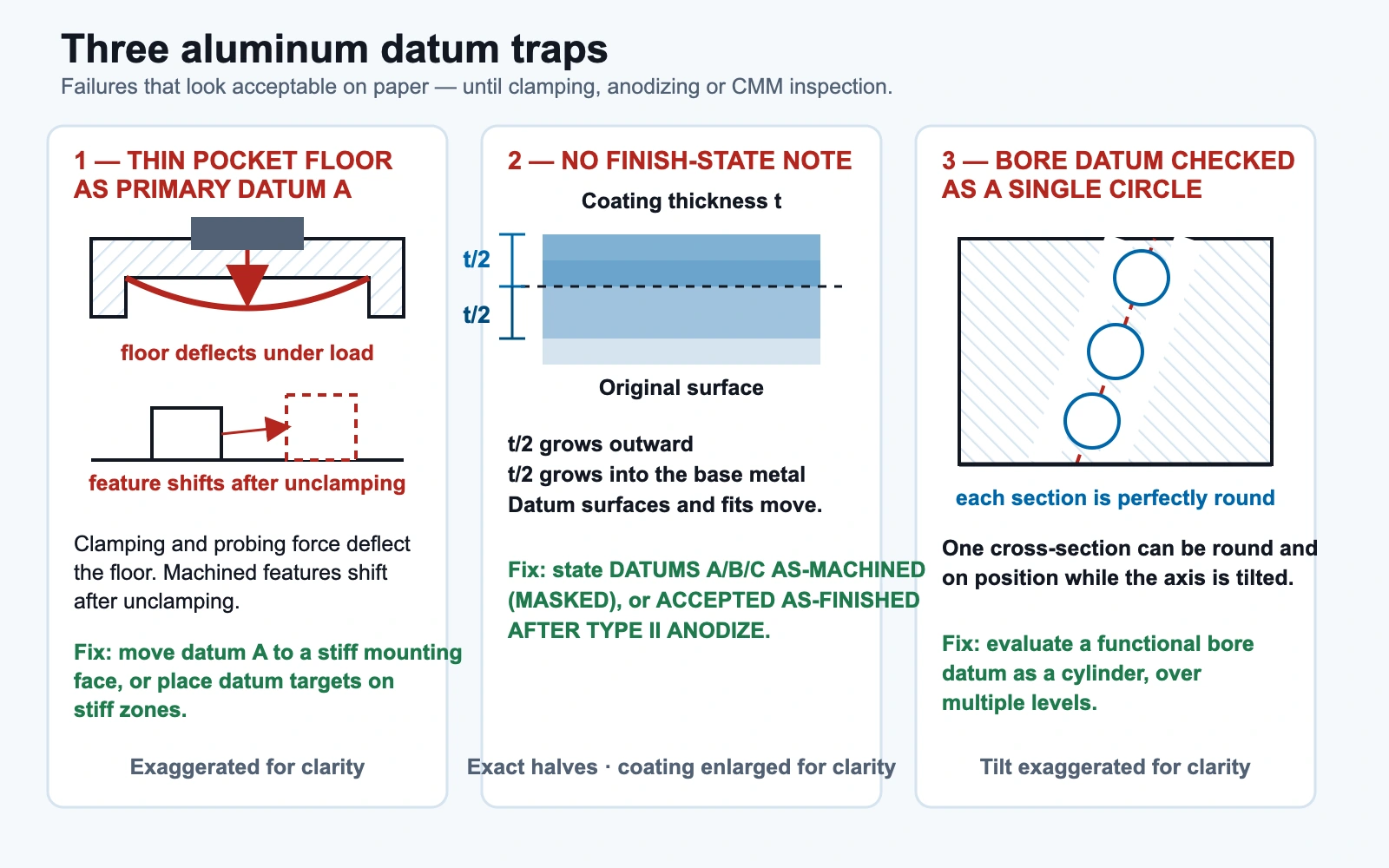
Aluminum CNC parts are often lightweight, pocketed, and anodized, and each of those traits creates its own datum problems.
| Trap | Why it hurts the quote or inspection | What to do on the drawing or RFQ |
|---|---|---|
| Thin wall or pocket floor as primary datum A | Clamping or probing force deflects the feature; relationships machined while clamped can shift after unclamping | Move datum A to a stiff mounting face; use datum targets; state free-state or restrained; verify after unclamping |
| Cosmetic face as primary datum A | Anodized show faces are chosen for appearance; they may be interrupted or not the mounting plane | Keep cosmetic requirements separate from the dimensional datum scheme; make datum A the functional mount or seal face |
| Raw stock or temporary face as datum | The stock face is machined away or is not functional after machining | Place datums on finished functional features only |
| As-machined vs as-finished conflict | Anodize grows outward, roughly half the coating thickness per coated surface as a design planning approximation, so datum surfaces and fits move | State whether datums A, B, C and critical fits are accepted as-machined (often masked) or as-finished |
| Mixed finish across the datum set | Datum A masked and datum B coated (or the reverse) with no note | Provide a masking list and the measurement state for each datum feature |
| Bore datum checked as a single circle | A single-section check loses tilt, so pin or shaft location can be wrong even when the circle looks good | Evaluate functional bore datums as a cylinder (multiple sections) when tilt matters |
| Ignoring movement after heavy pocketing | Aluminum plates and housings can move after heavy material removal | Avoid using a flexible floor as datum A; consider staged roughing and finishing or a stress-relief note |
Thin-wall geometry itself is covered in our thin-wall aluminum CNC design tips, and flatness control on large plates in how to control flatness in aluminum CNC machining. For drawing errors beyond datums, see common mistakes on aluminum CNC part drawings.
Finish state is part of the datum scheme
Anodize changes surface position: as a common design planning approximation, roughly half of the coating thickness grows outward from each coated surface, while chem film is usually treated as dimensionally negligible. The drawing therefore has to answer one question explicitly: are datums A, B, and C, and the fits that reference them, accepted before or after anodizing? “Before” usually means the datum features are masked; “after” means inspection happens on finished parts. Either answer works; silence does not. How finish state is reported at first article is covered in our first article inspection guide for aluminum CNC buyers.
Part-family patterns: housings, brackets, plates, and manifolds
These are generic engineering patterns built from the function-first rules above, not specific customer parts. Your assembly may justify a different scheme.
| Part family | Typically good A / B / C pattern | Typically bad pattern | Why |
|---|---|---|---|
| Housing or enclosure | A = mounting flange face that mates to the chassis; B = locating bore or long side wall; C = clocking slot or second locating feature | A = thin lid-pocket floor; A = cosmetic outer side wall; no datum C when a connector pattern needs clocking | The mounting flange is functional and stiff; pocket floors flex |
| Bracket | A = main mounting pad; B = second mounting edge or pin-hole axis; C = remaining hole or edge that stops the slide | A = wall of a lightening pocket; datums on features made in a secondary operation | Mounting pads define the assembly; thin webs bend |
| Plate or base plate | A = bottom mounting plane (with datum targets if large); B = long precision edge or dowel hole; C = short edge or second dowel hole | A = top cosmetic face; A = unfinished saw-cut edge; no flatness or support note | Large plates rock; stock edges are unreliable |
| Manifold block | A = main sealing face; B = main bore axis, evaluated as a cylinder; C = clocking face or slot that aligns the port pattern | A = the side carrying a milled logo; ports located from three different edges with no datum reference frame | The seal and the main bore dominate function; multi-edge schemes fight each other |
Generic example: an aluminum electronics housing
Consider a generic machined aluminum housing with a bottom mounting flange, a thin-walled pocket, an anodized cosmetic exterior, and a connector cut-out on one side.
- Weak scheme: Primary datum A on the large cosmetic outer wall because it is the biggest flat face; the connector cut-out dimensioned from two different outside edges; no finish-state note.
- Stronger scheme: Primary datum A on the mounting flange face (the chassis interface); secondary datum B on a locating bore or the long side wall; tertiary datum C on a clocking feature near the connector; connector position toleranced to A|B|C; a note that datum A is masked and accepted as-machined. Fixturing, machining, and inspection can all follow one frame.
For broader housing design considerations beyond datums, see our CNC machined aluminum housings design checklist. Bracket and manifold geometry topics are covered in CNC aluminum brackets for robotics applications and CNC machined aluminum manifold blocks design considerations.
How clear datums change the quote
A shop that receives an unclear datum scheme should not silently invent a datum reference frame. It will either raise a design-for-manufacturability (DFM) question or quote on conservative assumptions, and both add back-and-forth before the PO.
| With a clear datum reference frame and RFQ notes | With an unclear or missing datum reference frame |
|---|---|
| Fixture concept follows primary datum A on the drawing | The shop must choose temporary datums or raise a DFM query |
| Machining setups can group related features under one reference system | Datum transfer between setups adds risk; drift can come from transfer between setups rather than from machine accuracy |
| The inspection program mirrors the feature control frame precedence | Reports may use convenient local alignments, so dimensions look acceptable while the assembly fails |
| Quote assumptions are written down (“we assume datum A = flange face”) | Requotes happen when the buyer meant a different face |
The practical effect is process clarity: fewer clarification loops, fewer requotes caused by a misunderstood reference, and inspection results you can trust. How much that helps depends on the part and the supplier, so treat it as risk reduction, not a fixed saving.
How datum schemes feed first article inspection
First article inspection (FAI) checks whether the production process makes parts that conform to the drawing. A clear, functional datum scheme makes that evidence meaningful: setup and inspection alignment share one datum reference frame, so every position or profile result is reported in the frame the designer intended.
A datum scheme does not replace an FAI package; it makes the package’s dimensional results trustworthy. For what to request in the package itself, read the first article inspection guide for aluminum CNC buyers. Material identity and traceability documents, such as aluminum mill certificates, are a separate topic.
RFQ and drawing checklist for datum schemes
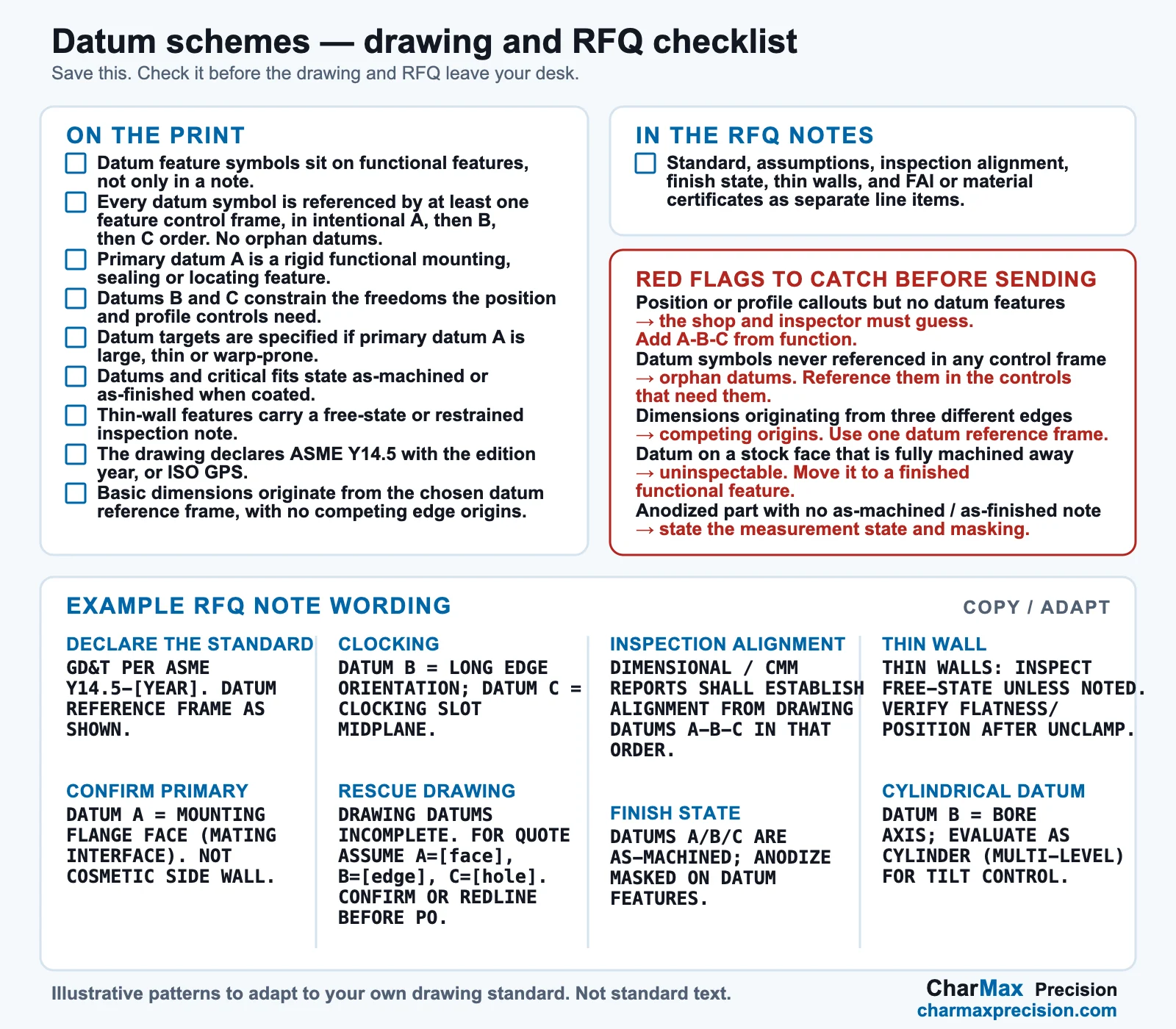
On the print
- Datum feature symbols sit on functional features, not only in a note.
In the RFQ notes
- Standard: “Interpret GD&T per ASME Y14.5-[year] (or ISO GPS).”
- Assumptions: “Assume datum A = [mounting flange face]; B = […]; C = […] unless the drawing conflicts. Confirm in DFM.”
- Inspection alignment: “Dimensional and CMM reports shall align to drawing datums A-B-C in that order.”
- Finish state: “Critical coated features accepted [as-machined / as-finished]; masking: [list].”
- Thin walls: “Inspect [free-state / restrained per note]; verify after unclamping.”
- FAI and material certificates: request them as separate line items if needed.
Red flags to catch before sending the RFQ
| Red flag on the print or RFQ | Likely consequence | Fix |
|---|---|---|
| Position or profile callouts but no datum features | The shop and inspector must guess; requote risk | Add A-B-C from function |
| Datum symbols never referenced in any feature control frame | Orphan datums; ambiguous intent | Reference the ordered datums in the controls that need them |
| Dimensions originating from three different edges | Competing origins and stack-up conflicts | Use one datum reference frame |
| Datum on a stock face that is fully machined away | Unstable or uninspectable reference across operations | Move the datum to a finished functional feature |
| Anodized part with no as-machined or as-finished note | Fit and datum disputes at inspection | State the measurement state and masking |
Example RFQ note wording
These are illustrative patterns to adapt to your own drawing. They are not standard text.
| Intent | Example note |
|---|---|
| Declare the standard | GD&T PER ASME Y14.5-[YEAR]. DATUM REFERENCE FRAME AS SHOWN. |
| Confirm a functional primary | DATUM A = MOUNTING FLANGE FACE (MATING INTERFACE). NOT COSMETIC SIDE WALL. |
| Clocking | DATUM B = LONG EDGE ORIENTATION; DATUM C = CLOCKING SLOT MIDPLANE. |
| Rescue an incomplete drawing | DRAWING DATUMS INCOMPLETE. FOR QUOTE ASSUME A=[face], B=[edge], C=[hole]. CONFIRM OR REDLINE BEFORE PO. |
| Inspection alignment | DIMENSIONAL / CMM REPORTS SHALL ESTABLISH ALIGNMENT FROM DRAWING DATUMS A-B-C IN THAT ORDER. |
| Finish state | DATUMS A/B/C ARE AS-MACHINED; ANODIZE MASKED ON DATUM FEATURES. or DATUMS A/B/C ACCEPTED AS-FINISHED AFTER TYPE II ANODIZE. |
| Thin wall | THIN WALLS: INSPECT FREE-STATE UNLESS NOTED. VERIFY FLATNESS/POSITION AFTER UNCLAMP. |
| Cylindrical datum | DATUM B = Ø__ BORE AXIS; EVALUATE AS CYLINDER (MULTI-LEVEL) FOR TILT CONTROL. |
On mixed standards: ASME Y14.5 and the ISO GPS datum system (ISO 5459) are parallel systems with different default rules, and global drawings sometimes mix them. Declare which one governs the print.
FAQ
What should be the default primary datum on an aluminum housing or plate?
The default primary datum is the functional mounting or sealing face that mates in the assembly, provided it is rigid and accessible. On a housing that is usually the mounting flange face; on a base plate it is usually the bottom mounting plane, with datum targets if the plate is large.
When is a cosmetic or thin face a bad primary datum?
A cosmetic or thin face is a bad primary datum when it is not the mating surface, when it flexes under clamping or probing force, or when it is controlled for appearance rather than location. Choose a stiff functional face or specify datum targets instead.
How do secondary and tertiary datums lock a bracket or manifold?
After the part contacts primary datum A, secondary datum B stops rotation (for example a second mounting edge or pin-hole axis on a bracket), and tertiary datum C stops the last translation (for example a clocking slot aligning a manifold’s port pattern). Datum features of size, such as a manifold’s main bore, constrain the part differently from flat datums.
How do datum choices affect shop setup and CMM alignment?
Fixtures and CMM programs should reproduce the drawing’s datum precedence. Unclear datums force assumptions or DFM questions, and an alignment that does not follow A-B-C makes position and profile results unreliable.
What should I write in the RFQ notes if the drawing datums are incomplete?
State the assumed datums A, B, and C based on function, ask the shop to confirm or redline them during DFM review, and require dimensional reports aligned to the agreed datum reference frame.
Should datums be as-machined or as-finished on anodized aluminum parts?
The drawing must say which. Anodize grows the surface outward, so datum surfaces and fits can move. Masking keeps datum features as-machined; accepting them as-finished means inspecting after coating.
Do aluminum plates need datum targets?
Often, when the primary face is large enough to rock or warp. Datum targets define specific stiff contact zones so setup and inspection start from the same stable primary.
How do good datum schemes make first article inspection cleaner?
They make each characteristic measurable against one intended frame, so first article results map directly to the drawing. They do not replace the FAI package; see our first article inspection guide.
How is a datum scheme different from drawing prep and tolerance guidance?
Drawing prep covers file-package completeness and tolerance guidance covers tolerance values. A datum scheme decides which features the part is referenced from, so those tolerances can be interpreted, fixtured, and inspected one way. See how to prepare drawings for CNC quotes and CNC machining tolerances for aluminum parts.
Getting datums agreed before the PO
A datum scheme is a short list of decisions: which feature the part sits on, which orients it, which stops it, and what condition it is in when measured. Decide from assembly function, put it on the print, repeat it in the RFQ notes, and the machinist, inspector, and estimator share one reference frame.